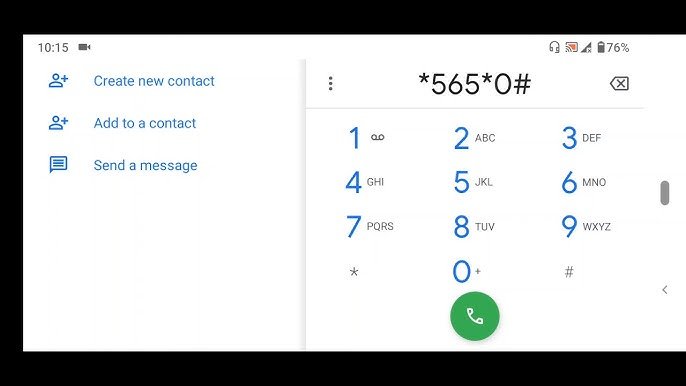
To check BVN on MTN, simply dial *565*0# on your mobile device. Your Bank Verification Number will be displayed on your screen instantly. This quick and convenient method saves you time and ensures that you have access to your BVN whenever you need it. No more hassle of looking for your BVN in paperwork or visiting the bank physically. Just a few taps on your phone, and you have your BVN ready at your fingertips. Easy, right?

How to Check BVN on MTN – A Comprehensive Guide
Welcome to our detailed guide on how to check your Bank Verification Number (BVN) using MTN, one of the leading telecommunication companies in Nigeria. Your BVN is an important piece of identification that is linked to your bank accounts, and it is crucial to have easy access to this information whenever needed. In this article, we will walk you through the simple steps to check your BVN on MTN, ensuring that you can quickly retrieve this essential number whenever the need arises.
What is BVN and Why is it Important?
Before we dive into how to check your BVN on MTN, let’s first understand what BVN is and why it is essential. BVN stands for Bank Verification Number, and it is a unique identification number that is linked to your bank accounts. The Central Bank of Nigeria introduced BVN to enhance security in the Nigerian banking system and to reduce fraudulent activities.
Your BVN serves as a means of verifying your identity when conducting transactions with financial institutions. It helps to prevent identity theft, fraud, and other forms of financial crime. Having your BVN readily accessible is crucial for smooth banking operations and maintaining the security of your accounts.
Checking Your BVN on MTN
Now, let’s get into the steps to check your BVN using MTN. MTN offers a convenient way for its customers to access their BVN information using their mobile phones. Follow the simple steps outlined below to retrieve your BVN quickly:
Step 1: Dial the USSD Code
To check your BVN on MTN, you need to dial a specific USSD code on your mobile phone. Simply dial *565*0# and press the call button. This code will initiate the process of retrieving your BVN information from the database.
Step 2: Enter Your Details
After dialing the USSD code, you will be prompted to enter certain details to verify your identity. Follow the on-screen instructions to provide the required information accurately. This step is essential to ensure that the BVN information retrieved is associated with your account.
Step 3: Receive Your BVN
Once you have entered the necessary details, you will receive a message containing your BVN information on your mobile phone screen. Make sure to note down or save this information securely for future reference. You can now access your BVN whenever you need it, thanks to MTN’s convenient BVN checking service.
Benefits of Checking Your BVN on MTN
Checking your BVN on MTN offers several advantages, making it a convenient and efficient way to access this vital information. Some of the benefits include:
- Quick and easy access to your BVN anytime, anywhere.
- Enhanced security by keeping your BVN information confidential.
- Convenient way to verify your identity during financial transactions.
- Peace of mind knowing that your BVN is readily available when needed.
FAQs About Checking BVN on MTN
Here are some frequently asked questions about checking BVN on MTN:
1. Is it Safe to Check my BVN on MTN?
Yes, it is safe to check your BVN on MTN. The process is secure, and MTN ensures the confidentiality of your BVN information.
2. Can I Check my BVN on MTN for Free?
MTN may charge a small fee for checking your BVN. Check with your mobile service provider for any associated costs.
3. What Should I Do if I Encounter Issues Checking my BVN on MTN?
If you face any difficulties checking your BVN on MTN, you can contact MTN customer service for assistance. They will guide you through the process and help resolve any issues you may encounter.
In Conclusion
Checking your BVN on MTN is a simple and convenient way to access your BVN information when needed. By following the steps outlined in this guide, you can quickly retrieve your BVN and ensure the security of your banking transactions. Remember to keep your BVN information confidential and secure to protect your accounts from unauthorized access. Take advantage of MTN’s BVN checking service to stay informed and in control of your financial information.
We hope this guide has been helpful in understanding how to check your BVN on MTN. If you have any further questions or concerns, feel free to reach out to MTN customer service for assistance. Stay secure, stay informed, and enjoy the convenience of accessing your BVN on the go with MTN!
How to Check BVN Number on Phone – All Networks
Frequently Asked Questions
How can I check my BVN on MTN?
To check your BVN on MTN, simply dial *565*0# from the phone number associated with your bank account. You will receive an SMS containing your BVN information shortly after.
Is there a fee for checking BVN on MTN?
No, checking your BVN on MTN is free of charge. You will not be charged any fees for using the *565*0# service to access your BVN.
Can I check someone else’s BVN on MTN?
No, for security and privacy reasons, you can only check the BVN linked to the phone number you are using. It is not possible to check someone else’s BVN on MTN using this method.
Final Thoughts
In conclusion, checking your BVN on MTN is a convenient way to access your banking information quickly. Simply dial the USSD code *565*0# and follow the prompts to verify your BVN with ease. This service provided by MTN ensures that you can stay updated on your financial details on the go. Don’t hesitate to use this efficient method to check your BVN on MTN whenever you need to.
About the Author