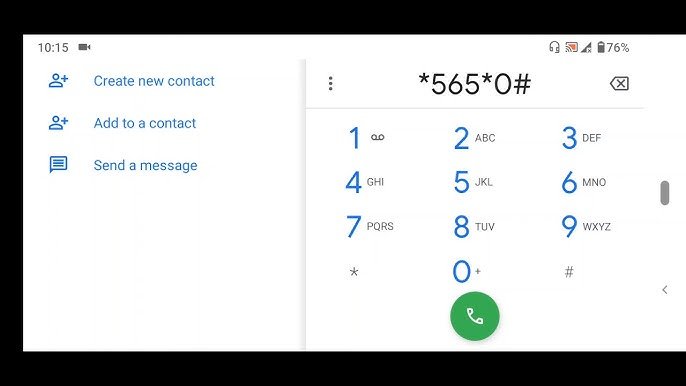
To check BVN on MTN, simply dial *565*0# on your mobile phone. Your Bank Verification Number (BVN) is a crucial identifier for banking transactions, and knowing how to easily access it can be quite handy. With this quick USSD code, MTN subscribers can conveniently retrieve their BVN anytime, anywhere. Stay tuned to discover more tips and tricks for managing your financial information effortlessly with MTN services.

How to Check BVN on MTN: A Comprehensive Guide
Welcome to our detailed guide on how to check your Bank Verification Number (BVN) on MTN. Your BVN is a unique identification number that links you to all your bank accounts in Nigeria, providing an extra layer of security and making transactions smoother. Checking your BVN on MTN is a simple process that can be done in a few easy steps. In this article, we will walk you through the process and answer any questions you may have along the way.
What is BVN and Why is it Important?
Before we dive into how to check your BVN on MTN, let’s first understand what BVN is and why it is important. BVN stands for Bank Verification Number, which is a biometric identification system implemented by the Central Bank of Nigeria to reduce fraud in the banking system. Your BVN is a unique 11-digit number that is linked to all your bank accounts, providing a secure and reliable means of identifying you when you carry out transactions.
Having a BVN is essential for various banking activities, including opening a new bank account, making transactions, accessing loans, and more. It helps to streamline banking processes and enhances security by verifying your identity before any financial transactions are carried out.
Checking BVN on MTN: Step-by-Step Guide
Checking your BVN on MTN is a straightforward process that can be done using your mobile phone. Follow these simple steps to retrieve your BVN:
Step 1: Dial the USSD Code
On your MTN mobile phone, dial *565*0# using the number associated with your bank account.
Step 2: Select Your Bank
After dialing the USSD code, you will be prompted to select your bank from the list of options provided. Choose the bank where you registered and linked your BVN.
Step 3: Enter Your Account Number
Next, you will be required to enter your bank account number linked to your BVN. Make sure to input the correct account number to proceed.
Step 4: Verify Your Identity
Once you have entered your account number, the system will verify your details and display your BVN on the screen. Take note of the BVN number for future reference.
Frequently Asked Questions (FAQs) about Checking BVN on MTN
1. Is it safe to check my BVN on MTN?
Yes, it is safe to check your BVN on MTN using the USSD code provided by your bank. The process is secure and encrypted to protect your personal information.
2. Can I check my BVN on MTN if I have multiple bank accounts?
Yes, you can check your BVN on MTN even if you have multiple bank accounts. Simply follow the steps outlined above and select the bank account for which you want to retrieve the BVN.
3. What should I do if I encounter issues while checking my BVN on MTN?
If you encounter any issues while checking your BVN on MTN, such as an incorrect BVN display or an error message, you should contact your bank immediately for assistance. They will be able to help you resolve any issues and ensure the accuracy of your BVN information.
Checking your BVN on MTN is a quick and convenient process that can be done from the comfort of your home using your mobile phone. Your BVN is an important piece of information that enhances the security of your banking transactions and provides a seamless banking experience. By following the simple steps outlined in this guide, you can easily retrieve your BVN and ensure that your financial activities are secure and protected.
Remember to keep your BVN confidential and avoid sharing it with unauthorized individuals to protect your personal information. If you have any further questions or need assistance with checking your BVN on MTN, don’t hesitate to reach out to your bank for support. Happy banking!
How to Check BVN Number on Phone – All Networks
Frequently Asked Questions
How can I check my BVN on MTN?
To check your BVN on MTN, simply dial *565*0# from the phone number linked to your bank account. Follow the on-screen prompts, and you will receive your BVN details via SMS shortly after.
Is there a charge for checking my BVN on MTN?
MTN does not charge any fee for checking your BVN. The process is free of charge, and you will only incur standard SMS rates, if applicable, for receiving the BVN details via text message.
What should I do if I encounter any issues while checking my BVN on MTN?
If you encounter any difficulties or receive an error message while trying to check your BVN on MTN, ensure that you are dialing the correct code (*565*0#) from the phone number linked to your bank account. If the issue persists, contact your bank or MTN customer service for further assistance.
Final Thoughts
To summarize, checking BVN on MTN is a simple process. Dial *565*0# on your MTN line, follow the prompts, and you’ll receive your BVN details promptly. Make sure your line is registered with the bank where you obtained your BVN. This quick and convenient method saves time and ensures you have your BVN information available whenever you need it. Remember, to check BVN on MTN, just dial *565*0#.
About the Author